
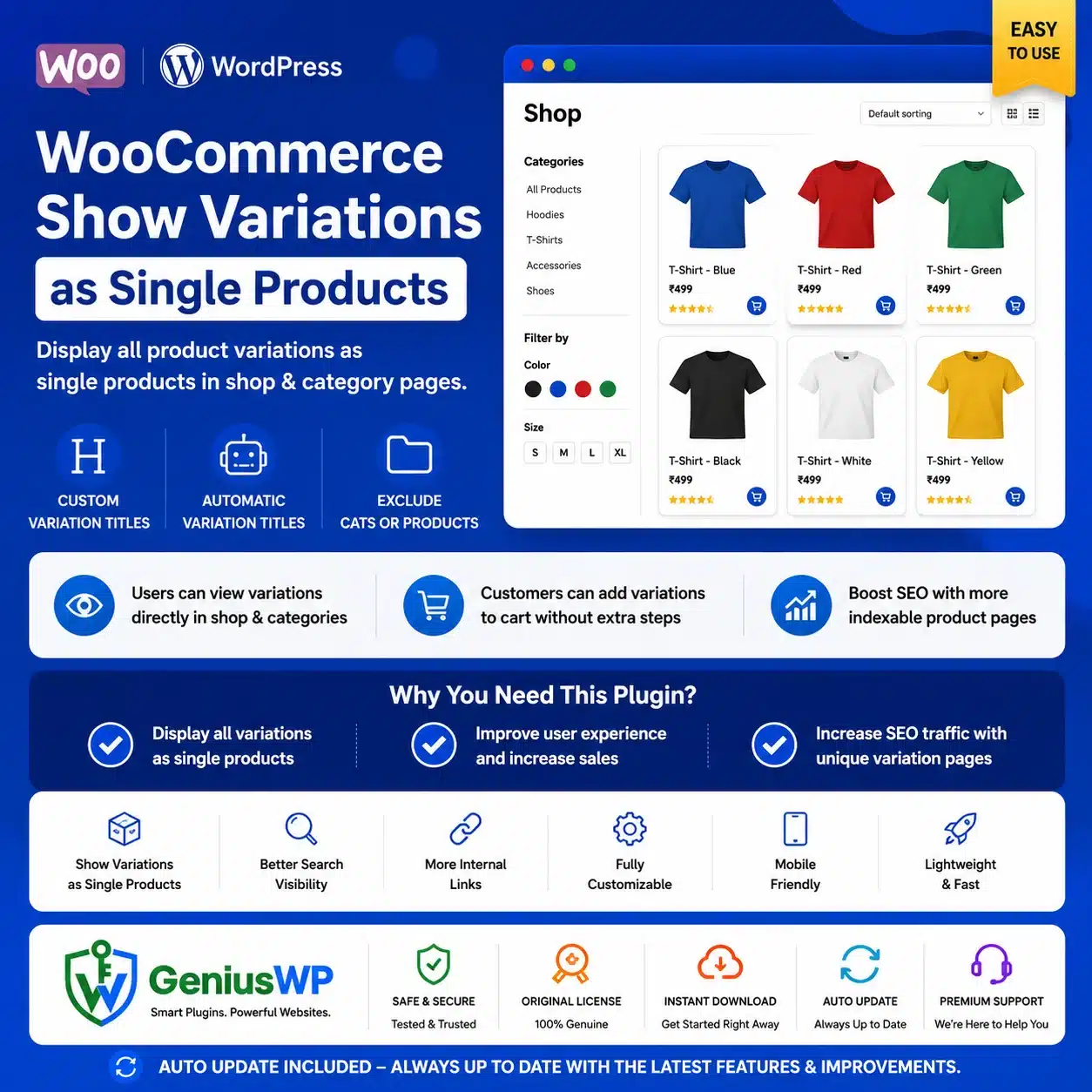

WooCommerce Show Variations as Single Products Plugin
WooCommerce Show Variations as Single Products is a powerful WooCommerce variation-display plugin that allows individual product variations to appear as separate products on your shop and category pages.
Instead of displaying only the main variable product, the plugin can show individual colours, styles, materials or other variations directly within product listings. Customers can therefore discover the exact variation they need without first opening the parent product and searching through dropdown options.
The plugin is especially useful for fashion, footwear, furniture, accessories and other WooCommerce stores that sell products in multiple colours, sizes or configurations.
Display Variations as Individual Products
By default, WooCommerce usually displays one parent variable product in the product catalogue. Customers must open that product page and select their preferred variation.
This plugin allows selected variations to appear as their own product listings on WooCommerce shop and category pages. Each displayed variation can direct the customer to the associated parent-product page with the relevant product option selected.
For example, a T-shirt available in black, blue and red can be displayed as three visually distinct catalogue items instead of one general variable product.
Key Features
✓ Display product variations as individual products
✓ Show variations on WooCommerce shop pages
✓ Display variations on product-category pages
✓ Support for default WooCommerce product search
✓ Support for default WooCommerce attribute filters
✓ Custom titles for individual variations
✓ Automatic and dynamic variation-title templates
✓ Include attribute names and values in titles
✓ Hide the main parent variable product
✓ Exclude selected product categories
✓ Exclude complete variable products
✓ Exclude individual variations
✓ Exclude selected attributes such as size
✓ Display only relevant colour variations
✓ Individual variation images and prices
✓ Simple WordPress administration settings
✓ Improve variation visibility in product listings
✓ Help customers locate exact product configurations
✓ No manual WooCommerce template editing required
✓ Genius WP auto-update access, where applicable
The developer documents support for dynamic and custom variation titles, parent-product hiding, WooCommerce search, default attribute filters and exclusions for categories, products, individual variations and attributes.
Dynamic Variation Titles
The plugin can automatically create descriptive titles for displayed variations using a customizable title template.
For example, a standard product named “Classic T-Shirt” could automatically appear as:
Classic T-Shirt in Colour Black and Size Large
You can define the title structure using the product name, attribute name and attribute value. This can make catalogue listings clearer and help customers distinguish between similar variations.
Custom Variation Titles
In addition to automatic titles, you can assign a completely custom title to an individual product variation.
For example:
- Classic Black Cotton T-Shirt
- Blue Slim-Fit Men’s Shirt
- Red Leather Handbag
- Oak Finish Dining Chair
Custom variation titles can make listings more meaningful for customers. They may also create more descriptive internal product URLs and content signals, although the plugin itself does not guarantee higher search rankings.
Exclude Selected Attributes
Stores often need to show one type of variation while hiding another.
For example, a shirt may be available in four colours and five sizes, creating twenty total variations. Displaying all twenty combinations in the catalogue could make the shop page difficult to browse.
The plugin allows selected attributes such as size to be excluded, so the store can show one listing for each colour rather than every colour-and-size combination.
Exclude Products, Variations or Categories
Store administrators can exclude:
- Complete product categories
- Individual variable products
- Specific product variations
- Selected variation attributes
This allows the single-variation display to be used only where it improves the customer experience.
Hide Parent Variable Products
Once variations are displayed separately, the original parent product can optionally be hidden from product listings.
Hiding the parent product can prevent duplicate-looking catalogue entries and keep the shop page focused on purchasable variations. The parent product can be shown again by changing the relevant plugin setting.
WooCommerce Search and Filter Support
The plugin supports the default WooCommerce product search, allowing matching variations to appear in search results.
It also supports default WooCommerce attribute filters. For example, when a customer filters products by the colour black, the relevant black variations can appear in the filtered product list. Compatibility with third-party filtering plugins can vary and should be tested separately.
Suitable For
- Clothing and fashion stores
- Footwear websites
- Furniture and home-decor stores
- Jewellery and accessories stores
- Electronics and gadget shops
- Cosmetics and beauty stores
- Custom merchandise websites
- Sportswear stores
- Wholesale product catalogues
- Stores offering multiple colours or styles
- WooCommerce shops with large variation catalogues
Why Choose This Plugin from Genius WP?
Genius WP provides convenient access to the supplied premium plugin package for WooCommerce store owners, developers and agencies.
You receive the downloadable plugin files, activated functionality included in the selected package and available updates through the Genius WP auto-update system, according to the selected website plan and update policy.
This plugin can simplify product discovery by presenting important variations directly inside WooCommerce catalogue pages instead of hiding every option behind one parent-product listing.


Reviews
There are no reviews yet.