


CartFlows Pro: Turn Your WooCommerce Checkout Into a Sales Funnel
CartFlows Pro helps you build funnels around your WooCommerce store: optimised checkout pages, order bumps, one-click upsells and downsells, and ready-made funnel templates.
- Order bumps, upsells and downsells
- One-click funnel templates
- A/B split testing for your funnels

What Is CartFlows Pro?
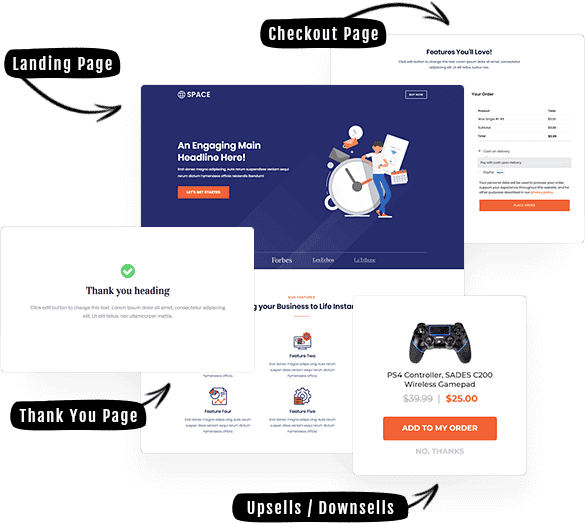
CartFlows is a funnel builder and checkout plugin for WooCommerce. It replaces the default checkout with a distraction-free experience and lets you guide customers through landing, checkout, upsell and thank-you steps. CartFlows Pro adds the revenue tools and templates that sit on top of the free plugin.
CartFlows Pro Features
Funnel Templates
Import professionally designed funnel templates and customise them in minutes.
Optimised Checkout
Use one-page, two-step or multi-step checkout layouts instead of the default checkout.
Order Bumps
Show an extra offer on the checkout page to increase the order value.
Upsells and Downsells
Add one-click offers after checkout, including dynamic upsell paths.
A/B Split Testing
Test different checkout pages, offers and headlines to see what performs best.
Unlimited Funnels
Create as many funnels and steps as your store needs with the Pro version.
Ready-to-Import Funnel Templates
Start from a template instead of a blank page. Pick a funnel layout, import it, then change the text, images and offers to match your brand.
Who Is CartFlows Pro For?
- WooCommerce store owners who want a better checkout and a higher average order value.
- Course creators and digital product sellers who want focused sales funnels.
- Marketers and agencies building funnels for clients.
- Page-builder users who want to design funnel steps visually.
How to Install CartFlows Pro
- Back up your site. Take a full backup, or test on a staging copy first.
- Install WooCommerce. CartFlows builds its checkout and funnels on top of WooCommerce.
- Install the free CartFlows plugin. Go to Plugins → Add New → Upload Plugin, upload the CartFlows zip and activate it.
- Install CartFlows Pro. Upload the CartFlows Pro zip the same way and activate it.
- Add your license details. If your download includes a license key file, follow the activation prompt shown by CartFlows Pro.
- Create your first funnel. Open CartFlows, choose a template and import it.
Before You Buy
- CartFlows works with WordPress and WooCommerce. Check the plugin’s own requirements on the official CartFlows page.
- Available options are 1 Year and Lifetime. Review the option details shown on this product page before you choose.
- GeniusWP is not affiliated with CartFlows or Brainstorm Force. CartFlows is a trademark of its owner.
- Support from the plugin’s author and access to its customer account are not included. For help with your purchase, contact GeniusWP support.
Need Help? Contact GeniusWP Support
Questions before or after your purchase? Email [email protected] or message GeniusWP on WhatsApp. You can also browse more premium WooCommerce plugins, read how to build a website with Elementor, or speed up your store with our WordPress speed optimization service.
CartFlows Pro FAQ
What is CartFlows Pro used for?
CartFlows Pro is used to build sales funnels and optimised checkout flows on WooCommerce. It adds order bumps, one-click upsells and downsells, A/B split testing, premium funnel templates and unlimited funnels on top of the free CartFlows plugin.
Do I need WooCommerce to use CartFlows Pro?
Yes, the checkout and order features are built for WooCommerce, so WooCommerce should be installed and active on your WordPress site.
Do I need the free CartFlows plugin as well?
Yes. CartFlows Pro works on top of the free CartFlows plugin, so install and activate the free plugin first, then CartFlows Pro.
Which options are available?
The product is listed with two options: 1 Year and Lifetime. Review the option details on the product page before you choose.
Is this an official CartFlows product?
No. GeniusWP is not affiliated with CartFlows or Brainstorm Force, and CartFlows is a trademark of its owner. Support from the plugin author is not included.
How can I contact GeniusWP support?
You can email [email protected] or message GeniusWP on WhatsApp at +91 9518978581.








Akash Joshi –
✓Customer ReviewAwesome price, and all functionality and features are working.
Sushil Rane –
✓Customer ReviewAll Pro features are working and the license is working fine.
Rakesh S –
✓Customer ReviewLicense working fine. Thank you.
Devkumar S –
✓Customer ReviewThank you for providing this plugin on a low budget. Thank you, team!