



🧩 All-in-One Elementor Addon
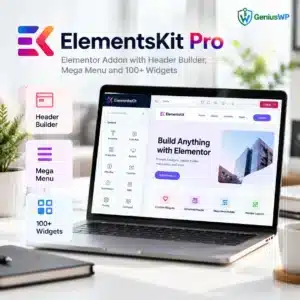
ElementsKit Pro: Supercharge Elementor With Header Builder, Mega Menu & 100+ Widgets
ElementsKit Pro adds everything Elementor is missing in one plugin: a header and footer builder, a mega menu builder, a large library of ready sections and templates, and dozens of creative widgets and extensions. Design complete, professional websites faster, without coding or extra plugins.
- Header & footer builder and mega menu builder
- 110+ widgets & extensions for Elementor
- 1,000+ ready sections and ready-made templates
- Cross-domain copy paste, sticky, parallax & more
🔒 Secure checkout📥 Digital download💬 WhatsApp & email support
⚡ Quick Answer
ElementsKit Pro is an all-in-one addon for the Elementor page builder by Wpmet. It adds a header and footer builder, a mega menu builder, 110+ widgets and extensions, 1,000+ ready sections, ready-made templates, cross-domain copy paste, advanced sticky, parallax, image masking and conditional content, so you can build complete websites visually.
Product type
Elementor addon plugin
Widgets
110+ widgets & extensions
Ready content
1,000+ sections and ready templates
Requires
WordPress, Elementor & ElementsKit Lite
Developer
Wpmet
What Is ElementsKit Pro?
Elementor is a great page builder, but on its own it does not give you a header builder, a mega menu or many advanced widgets. ElementsKit Pro fills those gaps in a single, well-organised plugin. You can design custom headers and footers, build rich mega menus, drop in professionally designed sections and full page templates, and add creative effects like parallax, sticky elements and image masking.
Every module can be switched on or off, so you only load what you use and keep your website fast.
Key Features of ElementsKit Pro
Header & Footer Builder
Design custom headers and footers in Elementor and show them site-wide or on chosen pages.
Mega Menu Builder
Create multi-column mega menus with any Elementor content inside.
Ready Sections & Templates
1,000+ ready sections and full home page templates to launch fast.
Widget Builder
Build your own custom Elementor widgets without writing a plugin.
Cross-Domain Copy Paste
Copy sections from one website and paste them into another.
Conditional Content
Show or hide content based on conditions you choose.
Advanced Sticky
Make headers, sections and columns stick while visitors scroll.
Advanced Parallax
Add parallax and motion effects for a modern, engaging look.
Image Masking
Shape images with creative masks for unique layouts.
Image Hover Effects
Eye-catching hover animations for images and cards.
Advanced Accordion & Tabs
Organise content neatly with flexible accordions and tabs.
Advanced Tooltip
Add helpful tooltips to any element on your page.
ElementsKit Pro Preview


ElementsKit Pro vs Element Pack Pro
Both are popular Elementor addons. Here is a quick comparison to help you choose. Swipe sideways on mobile.
| Feature | ElementsKit Pro | Element Pack Pro |
|---|---|---|
| Best for | Headers, mega menus and all-round site building | Huge widget and template variety |
| Widgets & extensions | 110+ | 230+ |
| Header & footer | Header & footer builder | Header & footer templates |
| Mega menu | ✓ | ✓ |
| Copy paste between sites | ✓ Cross-domain copy paste | ✓ Live Copy Paste |
| Show/hide rules | ✓ Conditional content | ✓ Display conditions |
| Developer | Wpmet | BdThemes |
Prefer a bigger widget library? See Element Pack Pro.
Choose the License That Fits You
Select an option from the dropdown at the top of this page. The price is shown in your local currency.
🔑 1 Website + 1 Year Update
Perfect for your own business site, blog or store.
🔑 Unlimited Website + Lifetime Update
Use ElementsKit Pro on as many websites as you need.
Who Is ElementsKit Pro For?
Elementor designers who want more widgets and creative control.
Business owners building a professional site without code.
Freelancers and agencies delivering client websites faster.
Sites needing custom headers and rich mega menus.
Store owners who design pages with Elementor.
Marketers launching landing pages quickly.
Why Buy ElementsKit Pro From GeniusWP?
Digital Delivery
Download from your account after your order is confirmed.
Update Access
Updates through the Genius WP auto-update system, where applicable.
Secure Payment
Pay safely through trusted payment gateways.
Real Human Support
Help from the GeniusWP team on WhatsApp or email.
How to Install ElementsKit Pro
- Back up your site or test on a staging copy first.
- Install Elementor and ElementsKit Lite from Plugins → Add New.
- Upload ElementsKit Pro via Plugins → Add New → Upload Plugin and activate it.
- Activate your license if your download includes a key.
- Enable the widgets and modules you need in the ElementsKit settings, then start designing in Elementor.
Want us to set it up? Our installation & license activation support team can do it for you.
Before You Buy
- ElementsKit Pro needs WordPress, the Elementor page builder and the free ElementsKit Lite plugin.
- Check the license option shown on this page before you place your order.
- GeniusWP is not affiliated with Wpmet. ElementsKit is a trademark of its owner. Support from the original author and access to their customer account are not included; for help with your purchase, contact GeniusWP support.
Ready to Supercharge Elementor?
Pick your license at the top of this page, complete checkout and download ElementsKit Pro from your account.
Explore More
ElementsKit Pro FAQ
What is ElementsKit Pro?
ElementsKit Pro is an all-in-one Elementor addon by Wpmet with a header and footer builder, mega menu builder, 110+ widgets and extensions and a large library of ready sections and templates.
Do I need Elementor Pro to use ElementsKit?
No. ElementsKit Pro works with the free Elementor plugin. It also needs the free ElementsKit Lite plugin.
Can I build a custom header and footer with ElementsKit?
Yes. The header and footer builder lets you design them in Elementor and display them site-wide or on selected pages.
Does ElementsKit include a mega menu?
Yes. The mega menu builder lets you create multi-column menus with any Elementor content.
Will ElementsKit slow down my website?
You can turn individual widgets and modules on or off, so only the features you use are loaded.
Which license options are available?
You can choose 1 Website + 1 Year Update or Unlimited Website + Lifetime Update. The price is shown in your local currency.
ElementsKit or Element Pack Pro, which should I choose?
Choose ElementsKit for its header builder, mega menu and all-round site building. Choose Element Pack Pro if you want the largest variety of widgets and templates.
How can I contact GeniusWP support?
Email [email protected] or message GeniusWP on WhatsApp at +91 9518978581.
Need help choosing? Email [email protected] or browse more Elementor plugins & addons, plugin & theme license keys and the GeniusWP membership.


Reviews
There are no reviews yet.