



Groovy Mega Menu Plugin: Navigation Visitors Love to Use
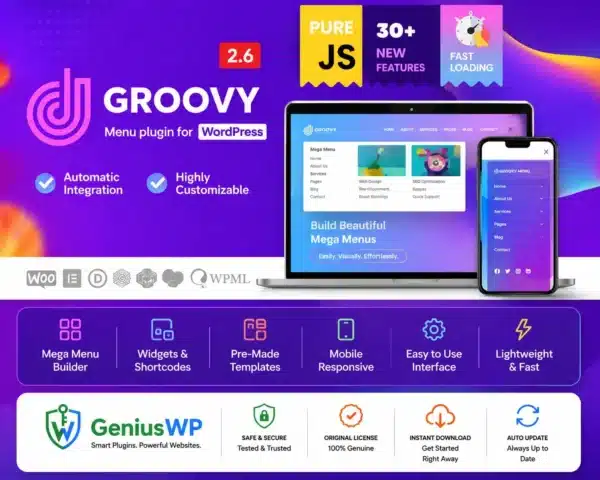
The Groovy Mega Menu Plugin helps you create rich, responsive mega menus for WordPress. Add columns, images, icons, product links and widgets to your navigation so visitors find what they want in one click.
Prices are shown in your local currency at checkout.
What Is the Groovy Mega Menu Plugin?
Standard WordPress menus are simple lists. When your site has many categories or products, a mega menu shows them in a clear, visual layout instead of long dropdowns.
Groovy Mega Menu works with most themes and includes a visual builder for menu content, sticky and mobile menu options, and many style presets. It is a popular choice for online stores, magazines and large business sites.
Key Features of the Groovy Mega Menu Plugin
🗂 Multi-column menus
Arrange links in columns with headings.
🖼 Images and icons
Make menus visual with images, icons and badges.
🧩 Widgets in menus
Add products, posts, search or HTML inside the menu.
📌 Sticky menu
Keep navigation visible while scrolling.
📱 Mobile menus
A dedicated, touch-friendly mobile layout.
🎨 Style presets
Change colours, fonts and effects without code.
Who Needs a Mega Menu?
- Online stores with many product categories.
- News and magazine sites with lots of sections.
- Large business websites with many services and pages.
- Agencies building navigation-heavy client sites.
License Options
Starter
Single Website
Agency
10 Website
Prices are shown in your local currency.
How to Install the Groovy Mega Menu Plugin
Complete your order. The plugin ZIP and any license file appear in My Account → Downloads right away.
In WordPress, go to Plugins → Add New → Upload Plugin, choose the ZIP file and click Install Now.
Activate the plugin. If a license file is included, enter the key from it on the plugin’s license screen.
Go to Appearance, Menus, enable Groovy for your main menu and build your first mega menu column.
Why Buy the Groovy Mega Menu Plugin from GeniusWP?
Instant access
Files are ready in your account the moment payment is confirmed.
Setup support
Stuck on installation or activation? Our team helps on WhatsApp and email.
Safe payments
Pay through secure, trusted gateways in your own currency.
More tools
Browse more premium WordPress plugins for your next project.
Groovy Mega Menu Plugin FAQ
Does the Groovy Mega Menu Plugin work with my theme?
It works with most WordPress themes and can replace or enhance your existing main menu.
Is the mega menu mobile friendly?
Yes. Groovy includes a mobile menu layout designed for touch screens.
Which license options are available?
You can choose Single Website or 10 Website. Prices are shown in your local currency at checkout.
How do I get the plugin after purchase?
The download is available instantly in My Account, Downloads, and in your order email as soon as your payment is confirmed.
Is GeniusWP the official developer of this product?
No. GeniusWP is an independent store and is not affiliated with the plugin developer. All trademarks belong to their respective owners.
How can I get help with installation or setup?
Message GeniusWP on WhatsApp at +91 9518978581 or email [email protected] and our team will guide you step by step.
You may also need
- ElementsKit Premium – includes an Elementor mega menu builder
- Ajax Search Pro – add live search to your header
- Astra Pro – a fast theme for any menu setup
- WordPress navigation menus guide – how menus work in WordPress
Upgrade your navigation today
Instant download, secure checkout in your local currency and friendly setup help on WhatsApp.
Disclaimer: GeniusWP is an independent reseller and is not affiliated with the plugin developer. Product names and trademarks belong to their respective owners.



Reviews
There are no reviews yet.